Skip to content

Buying guide

Digital Planners for iPad

A digital planner is a PDF built to be written on with a tablet and stylus: tabs down the side, tappable links between pages, and no paper. This guide covers how digital planners work, which apps to use, and what is inside ours.

By the Buy Activity Books team · Updated · 3 min read

The short answer

A digital planner is a hyperlinked PDF you open in a note-taking app like GoodNotes or Notability and write on with a stylus. Tabs and links let you jump between the year, months and weeks. Our 2026 digital planner has 73 landscape pages with over 1,100 tappable links.

Key takeaways

  • Tabs for the year, every month and notes on every page.
  • Tap a month on the year page, or a week row in a month, to open it.
  • Works in GoodNotes, Notability and most PDF annotation apps.
  • Sunday and Monday start editions included.

Our pack for digital planner

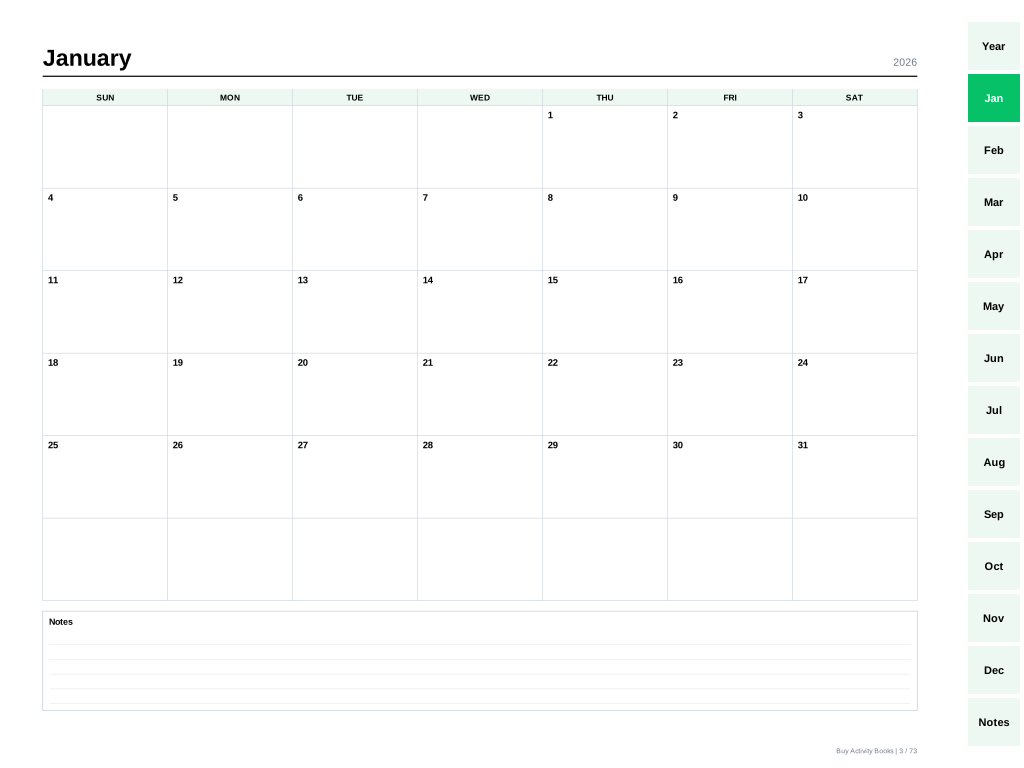
A sample page from 2026 Digital Planner for iPad
iPad and tabletsiPad and tablets

2026 Digital Planner for iPad

A landscape 2026 planner made for writing on an iPad or tablet: month tabs down the side on every page, tap a month to open its calendar, tap a week row to open that week, and tap back again. Works in GoodNotes, Notability and other PDF apps.

  • 73 pages with over 1,100 tappable links and tabs
  • Year, 12 monthly calendars, 53 weekly pages, notes and dot grid
  • Works in GoodNotes, Notability and most PDF annotation apps
  • Sunday-start and Monday-start editions
See inside →

At a glance

Digital Planner
CoversiPad and tablets
Pages73
SizesLandscape, 4:3
IncludesTabs: year, months, weeks, notes
Week startSunday or Monday
Price$8.99

How a digital planner works

  1. Download the PDF to your tablet.
  2. Open it in a note-taking app that supports PDF links.
  3. Tap a tab on the right to jump to a month.
  4. Tap a week row in the month to open that week; tap its title to go back.
  5. Write and draw with your stylus or finger.

Which apps work

Apps that keep the links in a PDF work best, including GoodNotes and Notability. Some apps open links only in a read mode; if a tap does not jump, check your app's link or read-mode setting.

What is inside

  • Cover and 2026 at a glance with tappable months.
  • 12 monthly calendars, each linking to its weeks.
  • 53 dated weekly pages that link back to their month.
  • Six notes pages: lined and dot grid.
  • A landscape 4:3 layout sized for iPad.

Digital vs. printable

Digital is lighter and never runs out of pages; paper is easier on the eyes and needs no battery. Our printable 2026 planner has the same calendar for paper, in US Letter, A4 and A5.

How we make every planner

Every planner is generated by computer from the calendar itself, so nothing is typed by hand and nothing can be misprinted.

  • Dates generated, not typed

    Every calendar is built from the year itself, so every date falls on the right weekday.

  • Every week, in order

    Weekly pages are checked to run one after another with no gaps or repeats.

  • Every edition included

    Paper planners in US Letter, A4 and A5, the iPad planner in landscape, each with Sunday and Monday start, all in one download.

  • Clean calendars

    No holidays printed, so you add the days that matter to you.

Questions about digital planner

Do I need GoodNotes?+

No. Any app that opens PDFs and lets you write on them works; apps that support PDF links give you the tabs.

Can I print the digital planner?+

You can, but it is laid out in landscape for a screen. For paper, the printable 2026 planner is the better fit.

How fast do I get it?+

Straight away. The download page opens as soon as payment goes through, and a link is emailed to you as well, so there is no shipping and no wait.

Related guides

All buying guides

Digital Planner 2026 for iPad: Tabbed, GoodNotes Ready